On Blogging and Social Media

To help educators get started with social media and blogging

Monday, June 10, 2013

Is Scoop.it the new Twitter?

Posted by Nik Peachey


Well I'll start by saying, actually no I don't think it is, but in my opinion it may well be better, because for me it has all the positives of Twitter and far fewer of the negatives.

For those who aren't familiar with Scoop.it, it's a web based platform for collecting and curating content based around themes, with it collects together in an interactive magazine like format. It also allows 'curators' to comment on the materials they collect and share the additions to their collections through a wide range of other social media platforms (including Twitter). This gives it a form of micro-blogging capability, especially as visitors to the site can also interact around the curated content and build conversations about it.
Here are two of my Scoop.it sites

If you have ever tried to build a conversation with multiple people asynchronously on Twitter, you will know how confusing that can become, but on Scoop.it the interaction appears below the content being discussed, so you can quite easily have multiple conversations on-going at the same time.


The other big advantage of Scoop.it is that discussion is based around content, which can help to give the interaction more depth. It also helps user to escape much of the banality that appears on Twitter as it tends not to attract the celebrity or 'what I had for lunch' postings as it isn't principally about conversation, but as more of a focus on content sharing.

Scoop.it use in the education sector also seems to be gaining momentum. My own principle Scoop.it sites have grown in terms of the number of followers (Yes, you can follow people on Scoop.it too) by about 500 - 600% over the last 2 months, so that they have now outstripped the Twitter following which has taken me years to nurture and develop.


Scoop.it now has it's own mobile reader  for iPad too which works in a similar way to Flipboard so you don't have to be a curator to use it, you can just download the app and follow the streams of information which suit you.
Scoop.it also works with MailChimp, so you can turn your Scoop.it updates into e-newsletters to your subscribers. You can also find a number of other interesting plug ins and apps at: http://www.scoop.it/extras

For me though, the big advantage over Twitter is the lack of 'noise'. I follow around 2.5k people on Twitter and as I watch my stream constantly flowing by it can be hard to separate the real gems from the rocks. With Scoop.it, users tend to broadcast a lot less and with much more of a focus on quality.

So will I be dropping Twitter? Actually, no. When I add something to my Scoop.it collections it allows me to simultaneously pass the links through to other networks including Twitter, Facebook, Linkedin and Google+, so I can make Scoop.it my main app for handling all of those networks.
Of course, Twitter does have some other advantages like the direct messaging feature that I also continue to use, and it's nice sometimes to take a break from other chores and just watch the various topic related streams I monitor through TweetDeck and pick out the odd link to follow up, but on the whole my main focus now is with Scoop.it and collecting together good quality content to share with my network.

If you want to give Scoop.it a try and aren't sure where to start, have a look at Russell Stannard's tutorial videos which should show you all you need to know to get started.
  • So which do you prefer?
  • Are you still committed to Twitter?
  • Are you using other curation tools?

By all means leave a comment.

Related links:

Best
Nik Peachey

Saturday, May 29, 2010

An introduction to Stumble Upon

Posted by Nik Peachey

Stumble Upon has been for some time one of my long term favorite browser plug in tools. It’s one of the best sources of interesting and sometimes offbeat new websites and can also be a great way to point people towards your own blog or website.

Just download the plug in to your browser tool bar, register for free and the discovering can begin.

So what’s so great about Stumble Upon?

  • Stumble Upon shows you new things
    The first thing that I really enjoy about it is the first button at the beginning of the toolbar. Whenever I have a spare moment or I’m feeling bored, I just click on the button and Stumble Upon will take me to a random website I’ve probably never seen before.
  • These websites aren’t completely picked at random though, the choice is based on the preferences / interests that each person puts in when they register, and based upon other sites you bookmark that you like.

  • Stumble Upon learns what you like
    Each time you come to or Stumble Upon send you to a website you like you click on the ‘thumbs up’ button and it stored in your favourites for later viewing, if you don’t like the site click the thumbs down icon and Stumble Upon will know that you don’t like those types of sites.
  • So the site learns about your preferences the longer you use it and gets better at finding things that you are likely to enjoy.

  • Focus your stumbling
    You can also focus your stumbling so that if you are particularly in the mood to find something to do with a particular interest like photography or music, you just stumble through those categories, or you can search through all you interests at random. Just use the drop down menu to choose.
  • Stumble Upon integrates with other aps
    If you are a regular user of other social networking and bookmarking applications. Stumble Upon can work with them to share what you find directly into Facebook or Twitter or help you email new find to a friend.
  • Stumble Upon is also a community
    When you find sites you like, you can also find out who added the site and who else likes the site and check out what other sites they have been adding. You can also start subscribing to their feed and becoming friends.
  • When you click on site that you like, Stumble upon also checks it’s database to see that site is a new one and if it is a new entry you can add a short review to the site. This will raise your profile with the Stumble Upon community as you’ll be credited as the discoverer of the site and will also help other people to find the sites, so getting your own sites or blogs into the system can be very helpful in bringing traffic to your site.

I hope this quick introduction to Stumble Upon gives you some idea of what a great tool this is and how you can use it. By all means check out the sites that I have found and added at: http://www.stumbleupon.com/stumbler/nikpeachey/ and if you like the things I’m bookmarking and think you have similar interests then let's become friends.

How about you?
  • How do you find new sites?
  • Do you rely on your community or are you looking for sites outside your profession?
  • What other social bookmarking tools do you use?

Saturday, September 12, 2009

Creating your broadcast network

Posted by Nik Peachey

I've been thinking a lot this week about the kinds of tools I use to put information 'out there' and looking at a few new ones that I'm trying to build in to my 'broadcast network', so I thought I would share a few of these and see what other educators out there think and use.

I can put my broadcast network tools onto a kind of cline or scale based around the 'richness' of the content and this correlates pretty much to the amount of time they take up to manage.

Blogging
At the top of the scale there are my blogs. Here I provide the richest original content and these are still fueled by the belief that 'content is king'. If I really want people to read what I have to say, get over a clear message deliver valuable materials for learning etc, I have to get down to work and create it. I have four blogs, this ones and 3 others:

  • Nik's Learning Technology blog - This one has tips and teaching suggestions as well as 'How to' type instructions and videos all focused on using technology in language teaching. It's the most time consuming, not only because the content is longer than the others and more detailed, but because I also try to provide 'How to' videos which I have to create and which I then upload to my YouTube channel.
  • Nik's Daily English Activities - This blog is where I publish materials for EFL ESL students and it contains tasks for students as well as a little bit of 'How to' information to help them develop their digital literacies. It is still quite time consuming to up date as I have to devise meaningful learning activities as well as produce a range of screen shots (all of which I create using a free tool called Skitch)
  • Nik's Quick Shout - This blog is where I publish a range of technology and EFL ESL related links to news articles or Web 2.0 type tools and software which can be used for educational purposes. I usually try to include a few suggestions and screen shots, but this one is still by far the quickest and easiest to update as the articles are much shorter, so when I'm not too busy I can get it updated every day.
Creating a news portal
Next down the scale is a tool that I've recently started using called Slinkset. Slinkset is a tool which allows you to create your own news type portal with different sections and links out to information around the web. Visitors can then vote this news information either up or down depending on how interesting they found it, a little like Digg.
I could allow others to submit articles etc to it, either by opening up access to anyone or creating an editorial group, but at present I'm just working alone on it to get it started. It isn't to time consuming and there is a really handy browser button which I've added to my tool bar and I just click on it when I see something interesting and then complete the submit form and post it to the site. It's not beautiful, but it's free and does a good job, so ...

The down side of this is that I still have to direct people to it and that means building it in to the rest of my network.


Social Bookmarking
The great thing about social bookmarking is the 'social' bit, but to make it social you really have to find and join groups of bookmarkers. I use Diigo because it has a nice toolbar button that makes it really easy to submit links just by clicking and adding some tags an annotation and also because there are a lot of active groups of social bookmarkers there who share links on topics that I'm interested in (Learning technology, ELT, Web 2.0 etc) on a daily basis. This also makes this a handy source of information. You can check out my Diigo profile here to see what groups I'm a member of, what I'm bookmarking and who my friends are.


Twittering
Next down the line and one of easiest and quickest to manage is Twitter. It's just a matter adding a link and typing a really short comment and you can send out a message to your network (or followers if you prefer). Twitter is great because you can get such quick responses back and because it can connect your network to the networks of all the people following you (if they think what you have to say is news worthy). There are loads of tools to make Twitter easier to use and probably like many others I use Tweet deck. Twitter is also a great source of incoming information and communication too. You can check out my twitter profile here and also see who is following me and who I'm following if you want to start building your own network.


Visual bookmarking
Another tool that I use quite a lot is SimplyBox. This is a great tool for quickly grabbing information from sites by taking a quick kind of screen shot of it. You grab an image of a text quote, video or image. One I have grabbed these images, using a button from my browser toolbar I can then drag the images into various categorised 'boxes' which are image bookmarks which link back to the original source. If I want to I can annotate them too.
I can use this as a broadcast tool in a number of ways. I can 'share' a box so that I collaborate with others in compiling the information, or I can also publish a link to a box so that anyone else can see the collection of bookmarked images in it. Here's an example of a box of visual bookmarks I've collected on the theme of E-Safety.

I can also set the boxes up so that anything I add can be automatically broadcast to my Twitter network. I've found this to be less successful though as the links are all sent through Twitter with the same annotation, which isn't so user friendly in terms of describing the content or why they should read it.

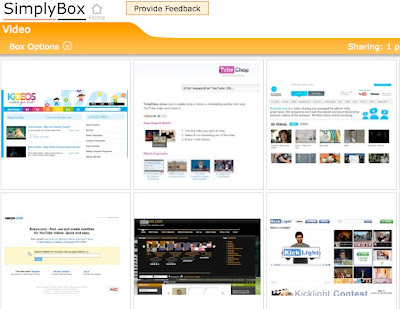
A nice recent addition to the tool though has been an embed code which allows you to share the visual bookmarks as a slideshow that you can embed into your blog or website. Here's an example of a box I created for storing links to useful video related sites.


The best thing about SimplyBox is that it's so quick and easy to use, the links are stored and I can decide later whether I want to annotate, publish or delete them, so it doesn't disturb my workflow too much or become distracting.

Okay, so those are some of the tools that make up my broadcast network and help me to get information out.

How about you?
  • What tools do you use?
  • How do you build your network?
  • Is content still king?
Do post a comment and let me know

Related links: