On Blogging and Social Media

To help educators get started with social media and blogging

Thursday, January 20, 2011

How to create a social network profile page

Posted by Nik Peachey

Most of us who have blogs these days also participate in a range of other social networks and use a range of social networking tools. Tying these together can help you to promote all the things you do, build your profile and make visitors to one service aware of other services you provide and so help you to develop your network. I've been looking for a long time for a good tool for this job and finally I think I have found it with http://about.me .

Here's a quick look at my social profile page to see what it looks like. Be sure to have a look round a few others to get some design inspiration.
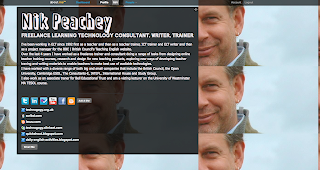

As you can see it is just a single page with a nice design, a bit of blurb about me and those all important links to all the things I do online. Below the surface though it also has a range of tools to help you track those services and it gives you information about how effective they are in building your network of contacts.

How to set up a social profile page

Let's start with the set up though. You'll need to go to: http://about.me register (for free) and you'll need a good high quality digital image of yourself that you can use as background (mine wasn't very good quality so I was forced to 'tile' it.

Once you are logged in you can start to design your background by choosing an image from your computer or selecting one from the site (best to have your own, but you can change it later).

Next you add your biography by simply typing your text into the fields. You then choose the colours and fonts for your text and the 'bio box' frame for the text. Be sure to use colours that make the text standout against the image background.


Lastly, the most important part is to start adding your services. This is simple to do. You just click on the service you want to add and then enter your username. If the service isn't there or you want to add a link to a website or another profile, just use the button that says 'Add URL or RSS' and you can add links to any web based site or service.


Once you have added your services, visitors to the page can have a peek at all the things you do. without leaving the page.


Building your network

This is all good stuff, but what is really great about this is the 'Dashboard' that gives you access to analytics information about your profile and some of the services you add there. You find out how many people click through to your profile and for how long. but you also get information about things like Twitter and find out which people retweet you the most or mention you etc. This can help to provide you with useful information about your network and find the best people to network with.
All in all I think http://about.me is a very useful free tool, whether you are building a network of friends colleagues or promoting your work.

How about you?
  • What tools do you use to create synergy across your social networking activities?
  • How do you reduce the amount of time you spend 'feeding' your networks?
  • What are the best tools for promoting your network activities?

By all means leave a comment or a question.

Wednesday, June 17, 2009

Blogging as part of the community

Posted by Nik Peachey

If you really want your blog or site to be useful, appreciated and get regular visitors then it’s vital that you are part of the community your serve. That means more than just pushing your content to places where you think potential visitors might be, but it means actually engaging with, understanding and being part of those communities.

Whatever profession you are in, but particularly in education there are multiple online communities and networks already existing that you can get involved in. To find these can involve a bit of searching but some good places to begin are:

  • Yahoo groups - They’ve been around a long time but there are still a great many very active yahoo groups and joining them often doesn’t cost you anything more than an email.
  • Professional associations - Find the websites for any professional associations that are connected with your field and see if they have email discussion lists or social networks that you can join. This might involve becoming a member, but often it doesn’t.
  • Social networks - There are a vast number of different social networking platforms like, Ning, SocialGo, Facebook etc. try to find the existing social networks connected to your field and join them.
  • Quality sites with forums - There are quite a few sites like the Guardian online BBC| British Council Teaching English, Macmillan's OnestopEnglish that you can register on and get involved with.
Being part of the community
This can have huge benefits for you, in terms of what you can learn about the needs and wants of the community. You are much more likely to get feedback on what you are getting right or wrong and you are also likely to be better informed about what’s happening and what your community is interested in. It gives you access to a huge range of knowledge and information from all over the world.

Remember though that it is important not to SPAM your community. It is vital that you build a good reputation for yourself and your site, but reputation is easily damaged, so make sure that what you contribute has value and responds to the needs of your community. Don’t just push out links to your content, write proper responses to questions and establish your expertise. This can be much more convincing and in the long run do you more good than just sending out a link to one of your web pages. Always act with integrity within the community and try to ensure that your contribution is positive. This doesn’t mean you have to lie, it just means that if you don’t have something good to say then don’t say anything.

Which communities to join
Here are some things you can do before joining an online community to make sure that you aren't wasting your time.
  • How many members does it have? - Communities with more members are more likely to be lively and active.
  • How much activity doe it generate? - There's usually some way of checking when a community was last active. If it hasn't been active for over a month then it's likely that the community has died. If it is a very active community you might want to think about looking for digest options so you aren't bombarded with information.
  • Who is in the community? - You can usually check the membership and see who is in the community in some way. Look for people of good reputation and also watch out for communities that have a lot people not connected with education in them.
  • What's happening in the community? - See if you can check out some of the recent postings and see what kinds of things users are talking about and sharing. This will give you some idea of whether or not you fit with the aims of this group.
  • What are the house rules? - See if you can find any house rules or code of conduct and then make sure you stay with it.

Here are some ELT and technology based communities that I would recommend joining.

Yahoo groups
  • Webheads in Action - fantastic group of people with a huge knowledge base and great source of information
  • Learning with computers - originally started in south America but now an international group of ELT educators dedicated to using technology in teaching

Organisations with email list based communities
  • IATEFL special interest groups - IATEFL has a number of special interest groups that have online communities that you can join for free. IATEFL stands for the International Association of Teachers of English as a Foreign Language and their mission is to link, develop and support English Language Teaching professionals throughout the world.
  • British Council ELTeCS - The news lists enable ELTeCS members to share information about opportunities, events, courses, projects, good practice, debates and ideas. There are six email based lists and you can choose the one for your particular part of the world (or join them all)
  • Mirandanet - The MirandaNet Fellowship, founded in 1992, is an e-community of practice for international ICT policy makers, teachers, teacher educators, researchers and commercial developers who are passionate about digital technology in teaching and learning and about using technologies to promote cultural understanding and democratic participation
Ning based social networks
Quality websites with forums
  • TeachingEnglish - The new version of this BBC | British Council site has forums and groups and enables commenting on most of their resources for registered users
  • OnestopEnglish - This long established site has forums that registered users can get involved in
Being part of an online community is a great opportunity for you to develop professionally, learn more about your profession and have richer and more diverse insights to offer within your blog content. I hope you take advantage of these opportunities and bring something valuable to the communities you join.
How about you?
  • Which online communities are you active in?
  • Are communities useful or do they take up too much of your time?
Please leave a comment or question