On Blogging and Social Media

To help educators get started with social media and blogging

Monday, June 10, 2013

Is Scoop.it the new Twitter?

Posted by Nik Peachey


Well I'll start by saying, actually no I don't think it is, but in my opinion it may well be better, because for me it has all the positives of Twitter and far fewer of the negatives.

For those who aren't familiar with Scoop.it, it's a web based platform for collecting and curating content based around themes, with it collects together in an interactive magazine like format. It also allows 'curators' to comment on the materials they collect and share the additions to their collections through a wide range of other social media platforms (including Twitter). This gives it a form of micro-blogging capability, especially as visitors to the site can also interact around the curated content and build conversations about it.
Here are two of my Scoop.it sites

If you have ever tried to build a conversation with multiple people asynchronously on Twitter, you will know how confusing that can become, but on Scoop.it the interaction appears below the content being discussed, so you can quite easily have multiple conversations on-going at the same time.


The other big advantage of Scoop.it is that discussion is based around content, which can help to give the interaction more depth. It also helps user to escape much of the banality that appears on Twitter as it tends not to attract the celebrity or 'what I had for lunch' postings as it isn't principally about conversation, but as more of a focus on content sharing.

Scoop.it use in the education sector also seems to be gaining momentum. My own principle Scoop.it sites have grown in terms of the number of followers (Yes, you can follow people on Scoop.it too) by about 500 - 600% over the last 2 months, so that they have now outstripped the Twitter following which has taken me years to nurture and develop.


Scoop.it now has it's own mobile reader  for iPad too which works in a similar way to Flipboard so you don't have to be a curator to use it, you can just download the app and follow the streams of information which suit you.
Scoop.it also works with MailChimp, so you can turn your Scoop.it updates into e-newsletters to your subscribers. You can also find a number of other interesting plug ins and apps at: http://www.scoop.it/extras

For me though, the big advantage over Twitter is the lack of 'noise'. I follow around 2.5k people on Twitter and as I watch my stream constantly flowing by it can be hard to separate the real gems from the rocks. With Scoop.it, users tend to broadcast a lot less and with much more of a focus on quality.

So will I be dropping Twitter? Actually, no. When I add something to my Scoop.it collections it allows me to simultaneously pass the links through to other networks including Twitter, Facebook, Linkedin and Google+, so I can make Scoop.it my main app for handling all of those networks.
Of course, Twitter does have some other advantages like the direct messaging feature that I also continue to use, and it's nice sometimes to take a break from other chores and just watch the various topic related streams I monitor through TweetDeck and pick out the odd link to follow up, but on the whole my main focus now is with Scoop.it and collecting together good quality content to share with my network.

If you want to give Scoop.it a try and aren't sure where to start, have a look at Russell Stannard's tutorial videos which should show you all you need to know to get started.
  • So which do you prefer?
  • Are you still committed to Twitter?
  • Are you using other curation tools?

By all means leave a comment.

Related links:

Best
Nik Peachey

Thursday, October 8, 2009

How to create a visitor contact form

Posted by Nik Peachey

Most bloggers welcome contact with there readers, but that doesn't mean we want to put our email address on every page of our site. I know that most of us want visitors to leave comments, but there are times when this isn't really appropriate (e.g. Someone likes your blog and wants some advice or to offer you some work etc.)

Visitor contact offers a great free solution. You can see what it looks like and try it on the left of my site. It looks like this.
Just click on the contact tab and you'll see it opens up an email submission form with contact details that doesn't include my email address and it's spam protected.

How to create a visitor contact form

  • This is really quick and easy to set up. Simply go to the Visitor Contact site and sign up for the free service.
  • You only need to add very basic information such as email and create a user name and password to get started

  • Once that's done you just need to add the details of your site and you email address. You can decide whether you want your actual email address to be visible or not.
  • You can then add other information such as address, telephone number and Skype contact if you wish.
  • You can also set up an auto response message that people will be sent once they have emailed you.
  • Last of all you decide on the colours you want the tab to be and then click on 'Create Form and Get Button' and you are done.

  • This will create a code that you then just add to the script of your web page or blog. If you are using blogger, you just go to 'Layout' then 'edit HTML' and scroll down your code and add it at the bottom just above the tag that closes the body .
  • Be sure to save your code and then go back to your blog and the contact tab should appear on the left. Click it and send yourself a test message.


Visitor Contact is a great way to make yourself more accessible to your readers without getting loads of SPAM. You can add as many forms as you like to your account, so if you have more than one site you can manage them all from one account. You can also go back and edit your contact form at any point if you change your mind about the colour or amont of information you want to display.

All in all I think this is a useful free tool.

How about you?
  • What do you do to encourage reader contact?
  • Do you allow comments of your site?
Feel free to leave a comment with your recommendations for increasing contact with your readers.

Friday, October 2, 2009

What's your favourite widget?

Posted by Nik Peachey

There are lots of different widegts out there that you can plug into your blog, but my favourite by far has to be the Wibiya tool bar. I have it in all of my blogs now (except at present this one) and I am so impressed. Wibiya has enables me to get rid of half a dozen other quite baisc but necessary widgets that were cluttering up my side bar and slowing down my site and has combined their functinality and some other very useful functions into one really useful tool bar widget that you can see along the bottom of my blogs. (See Quick Shout)


Here's what the Wibiya widget can do:

  • It has a built in search that can search through your blog archive or through Google. So that enabled me to get rid of the Blogger search bar from along the top of my blog and the one I had in my side bar.
  • It is integrated with Google translation tools so now at the click of a buton my visitors can read my blog in any of ten different languages.
  • Visitors to my site can now scroll throuugh an index of recent articles that have been published on the site or just click for a random posting. This is great for blogs that have loads of archive pages that seldom get visited and it enables me to get rid of another two widgets from my side bar.
  • There is the RSS subscription widget and the 'Share' widget. Both of these were widgets in my sidebar, but now I have this which enables users to post my articles to any of the most popular bookmarking or social networking sites.
  • It integrates with my Facebook profile, so my status updates are posted to a small Facebook community feature on the site and visitors to the site can join the community and leave messages there. This should enable my visitors to build connections both with me and each other through the site. This doesn't mean they become Facebook friends though, unless they take that extra step themselves , it just enables them to see what's going on with me and see what other Facebook members are visiting my site. There is an option to integrate this with a Facebook fan page, but I haven't tried that yet.
It integrates with Twitter (so there's another widget I can get rid of from my side bar) and very nicely too. It shows my Tweets and how to follow me in one column and in the other it shows any Tweets that have mentioned my blog. This is really handy because I can then track down the people on Twitter who have a similar interest to mine and follow them. It also enables vistors to the site to do the same thing, so the whole community benefits and moves a bit closer together. Fantastic.

  • It has a humble message feature that you can set to display a small message every time someone comes to your blog. You can change these messages so it's a great way of flagging up events that you might be involved in or notifying visitors of future down time etc.
Well, I thought it couldn't get any better, but it does. When you go in to your Wibiya account and go to the dashboard, you also get stats showing you which features have been used and how many times, etc.

Is there a catch?

Well I can't find one. It's absolutely free and really easy to install and it starts working pretty much straight away. If there is a problem it is that you can only have one account per email address, so that means you can't run multiple blogs from the same account.

It's also still in beta at the time that I wrote this so it takes just under a week after registering to get your account. Apart from that I think this is a fantastic tool bar for a blog or website and one that can help you and your users build a lose network around your site and help visitors to access much more of the site. That's great.

How about you?
  • What are your favourite blog or site widgets?
  • How do you get vistors to look further than the first page on your blog?
  • How do you build community around your site?
Please do leave a comment.

Saturday, September 12, 2009

Creating your broadcast network

Posted by Nik Peachey

I've been thinking a lot this week about the kinds of tools I use to put information 'out there' and looking at a few new ones that I'm trying to build in to my 'broadcast network', so I thought I would share a few of these and see what other educators out there think and use.

I can put my broadcast network tools onto a kind of cline or scale based around the 'richness' of the content and this correlates pretty much to the amount of time they take up to manage.

Blogging
At the top of the scale there are my blogs. Here I provide the richest original content and these are still fueled by the belief that 'content is king'. If I really want people to read what I have to say, get over a clear message deliver valuable materials for learning etc, I have to get down to work and create it. I have four blogs, this ones and 3 others:

  • Nik's Learning Technology blog - This one has tips and teaching suggestions as well as 'How to' type instructions and videos all focused on using technology in language teaching. It's the most time consuming, not only because the content is longer than the others and more detailed, but because I also try to provide 'How to' videos which I have to create and which I then upload to my YouTube channel.
  • Nik's Daily English Activities - This blog is where I publish materials for EFL ESL students and it contains tasks for students as well as a little bit of 'How to' information to help them develop their digital literacies. It is still quite time consuming to up date as I have to devise meaningful learning activities as well as produce a range of screen shots (all of which I create using a free tool called Skitch)
  • Nik's Quick Shout - This blog is where I publish a range of technology and EFL ESL related links to news articles or Web 2.0 type tools and software which can be used for educational purposes. I usually try to include a few suggestions and screen shots, but this one is still by far the quickest and easiest to update as the articles are much shorter, so when I'm not too busy I can get it updated every day.
Creating a news portal
Next down the scale is a tool that I've recently started using called Slinkset. Slinkset is a tool which allows you to create your own news type portal with different sections and links out to information around the web. Visitors can then vote this news information either up or down depending on how interesting they found it, a little like Digg.
I could allow others to submit articles etc to it, either by opening up access to anyone or creating an editorial group, but at present I'm just working alone on it to get it started. It isn't to time consuming and there is a really handy browser button which I've added to my tool bar and I just click on it when I see something interesting and then complete the submit form and post it to the site. It's not beautiful, but it's free and does a good job, so ...

The down side of this is that I still have to direct people to it and that means building it in to the rest of my network.


Social Bookmarking
The great thing about social bookmarking is the 'social' bit, but to make it social you really have to find and join groups of bookmarkers. I use Diigo because it has a nice toolbar button that makes it really easy to submit links just by clicking and adding some tags an annotation and also because there are a lot of active groups of social bookmarkers there who share links on topics that I'm interested in (Learning technology, ELT, Web 2.0 etc) on a daily basis. This also makes this a handy source of information. You can check out my Diigo profile here to see what groups I'm a member of, what I'm bookmarking and who my friends are.


Twittering
Next down the line and one of easiest and quickest to manage is Twitter. It's just a matter adding a link and typing a really short comment and you can send out a message to your network (or followers if you prefer). Twitter is great because you can get such quick responses back and because it can connect your network to the networks of all the people following you (if they think what you have to say is news worthy). There are loads of tools to make Twitter easier to use and probably like many others I use Tweet deck. Twitter is also a great source of incoming information and communication too. You can check out my twitter profile here and also see who is following me and who I'm following if you want to start building your own network.


Visual bookmarking
Another tool that I use quite a lot is SimplyBox. This is a great tool for quickly grabbing information from sites by taking a quick kind of screen shot of it. You grab an image of a text quote, video or image. One I have grabbed these images, using a button from my browser toolbar I can then drag the images into various categorised 'boxes' which are image bookmarks which link back to the original source. If I want to I can annotate them too.
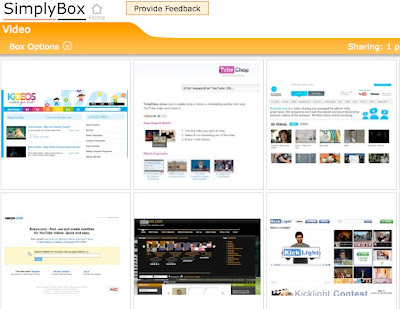
I can use this as a broadcast tool in a number of ways. I can 'share' a box so that I collaborate with others in compiling the information, or I can also publish a link to a box so that anyone else can see the collection of bookmarked images in it. Here's an example of a box of visual bookmarks I've collected on the theme of E-Safety.

I can also set the boxes up so that anything I add can be automatically broadcast to my Twitter network. I've found this to be less successful though as the links are all sent through Twitter with the same annotation, which isn't so user friendly in terms of describing the content or why they should read it.

A nice recent addition to the tool though has been an embed code which allows you to share the visual bookmarks as a slideshow that you can embed into your blog or website. Here's an example of a box I created for storing links to useful video related sites.


The best thing about SimplyBox is that it's so quick and easy to use, the links are stored and I can decide later whether I want to annotate, publish or delete them, so it doesn't disturb my workflow too much or become distracting.

Okay, so those are some of the tools that make up my broadcast network and help me to get information out.

How about you?
  • What tools do you use?
  • How do you build your network?
  • Is content still king?
Do post a comment and let me know

Related links:

Wednesday, September 9, 2009

10 free blogging tools for teachers

Posted by Nik Peachey

Well it's high time I got this blog moving again and I'm grateful to Karen Schweitzer education writer and author for sending in this guest post to get me started. Here she presents 10 great tools ranging from the basics for getting your blog started to some really interesting tools for getting your blog noticed. Thanks Karen.
Teachers who are interested in starting their own blogs or creating and managing student blogs, can find a number of helpful tools online. There are free blogging platforms made specifically for educators, virtual classrooms for students, and tools to help make other people more aware of your blogging efforts. Here are 10 free tools that would be particularly useful to teachers.

Edublogs - Edublogs is a free blogging platform for students and teachers. The WordPress powered platform hosts hundreds of thousands of education-related blogs. Teachers use it to host their own blogs, to manage student blogs, and to supplement classroom learning. Edublogs offers a wide range of features (20 MB of free space, customizable themes, step-by-step support, and import/export capabilities) and allows for simple uploading of images, videos, and other files.
Ning - Ning is a free online service that can be used to create your own social network. Ning networks can be kept private or made public. Any member who joins a network also has the option of keeping their profile private. Some of the things that can be placed on a Ning network include blogs, photos, videos, member profile pages, messaging systems, and RSS support. More than one million networks have been launched with Ning in the last two years, so if you would prefer, you can also find an existing social network to join.

Teacher Lingo - Created by a retired middle school teacher, this teacher blog community is a great place for teachers to connect, share ideas, and find lesson plans online. Teachers can begin their own blog or feed a previously created blog to the site. Teacher Lingo also offers a forum for friendly discussion.

Tumblr - Tumblr is an excellent option for teachers who are just beginning to blog. This free online blogging platform is easy to use and fully customizable. Features include the ability to create private blogs or private posts, multiple posting options, built-in apps, and ad-free themes. Tumblr also tweets posts automatically (or selectively if you choose.)

21Classes - 21Classes is a cooperative learning and blogging platform for students and teachers. It can be used to launch a class homepage and create individual blogs for students. Each student receives 1 MB of space with the free edition. Teachers have access to a central console to manage student accounts and content. More space and additional features are available with paid accounts.
ClassChatter - ClassChatter is a safe, secure, and private blogging platform for students and teachers. It can be used to create individual student blogs, group blogs, and assignment blogs. Unlike some blogging platforms, ClassChatter is free of advertising and includes an email-like communication option.

Class Blogmeister - Developed specifically for classrooms, this blogging engine offers free accounts to teachers, professors, school leaders, librarians, and other education professionals. Accounts can be used to post assignments, student writing, and instructional activities. Students are not allowed to have their own blogs but they can participate within the account established by their teacher.
IntenseDebate - IntenseDebate is a free commenting system for blogs. The system is meant to encourage more comments and enhance commenting capability. Features include comment threading, email notifications, reply-by-email, Twitter integration, hardcore moderation, blacklisting, comment voting, and many other useful widgets and plugins.

AddThis - This free online service can be used to build social bookmarking and feed buttons for your blog. These buttons make it easier for blog readers to stay up-to-date and share your content with other people. AddThis supports more than 50 popular services including Delicious, Digg, Facebook, MySpace, StumbleUpon, Twitter, Tumblr, and WordPress.

Twitterfeed - Teachers who blog and use Twitter will love Twitterfeed. This free web-based app tweets blog posts automatically so that you can share blog content with your Twitter followers.

Guest post from education writer and author Karen Schweitzer. Karen is the About.com Guide to Business School. She also writes about online classes for OnlineClasses.org.

How about you?

  • What blogging tools are you using?
  • Which of these 10 will you be checking out?
Related links:

Monday, July 20, 2009

Is your content being stolen?

Posted by Nik Peachey

The Internet has revolutionised the way and amount of information that we can publish and share and being able to contribute your knowledge to the growth and development of others in your profession can be very rewarding, but once you’ve put your information out there, it’s wise to keep track of what happens to it and who is using it.

Here are some tools to protect your copyright

Fairshare is a good free service that allows you to register your websites and then subscribe to an RSS feed that shows you where on the web your content is being republished and what percentage of your posting was used.

Fairshare is also in the process of setting up a system by which you can get paid a portion of advertising revenue if your content is being used by other sites. Here you can download a (440k) PDF showing you how to set up Fairshare to track your content.


Copygator is a service which will search the web against a URL that you enter and look for places where content from that source appear. They also supply a small image that you can add to your webpages and if the content is copied elsewhere you can be notified.


So why is it so important to track where your content is going?

  • It’s a much misunderstood and largely false assumption that your content, once published on a free blog or website, belongs to everyone and anyone. This simply isn’t true. If you publish something on your site, then it belongs to you and nobody else, unless you say so.
  • Unfortunately, despite the above fact, it is still pretty easy for anyone to take what you produce. If that is someone copying your article to use with students or to share with other people in your profession that may well be fine with you, especially if they acknowledge you as the source and provide a link back to your site, but that isn’t always the case.
  • There are companies that set up thousands of websites and just copy in content from other sites in an effort to generate money through advertising. They never actually produce their own content, just rip off other people’s and in many cases without any links back or credit.
  • There are also those who set up sites and just copy content they find interesting. This could be well intentioned and they may be crediting you as the source, but if they are doing it on a regular basis this could well start to have a negative impact on your own site.

So what harm can it do?

  • Well firstly, if someone is viewing your work on another site, then they aren’t visiting your site, so they are reducing your site traffic. If you rely on visitor numbers and page impressions to get funding, then this can start to endanger your site.
  • There is also the risk that search engines like Google who try to spot sites that are copying content in multiple places blacklist your site as one of the copies.
  • If you ever want to make money from your site (and why shouldn’t you? We all need to eat) by either selling the content for republication or selling the whole site etc whoever pays for it will want to know that what they are getting is original and unique.
Whatever the reason and whoever is copying your content, it’s always good to know where your content is going. You can always say 'thank you' if they are crediting you and including links back and references and you could even explore partnerships or getting paid to syndicate out your content.

If they aren’t crediting you as author of the content and linking back, you could drop them a message asking them to credit you with a link back or even ask them to remove your content from their site and remind them that what they are doing is theft of your intellectual property.

Here you can download a (440k) PDF showing you how to set up Fairshare to track your content.

How about you?
  • How do you protect your copyright?
  • Do you track where your content is going?
  • Are you bothered if someone copies your content?

Drop me a line or leave a comment below.

Wednesday, July 15, 2009

Selling your teaching materials online

Posted by Nik Peachey

I'm sure that every teacher has at some point produced something that they have felt has commercial potential, but trying to earn money from your work through a publisher can be a slow, time consuming and ultimately frustrating experience because:

  • Most publishers know what they want to produce and select the people they want to produce it.
  • It is very unusual for a writer to approach the publisher with a project and get it taken on.
  • Many teachers only have time to produce small amounts of material rather than complete books.
So, recently I've been asked by a few people about the potential of selling their work directly to customers online and whereas I can see there are some potential obstacles to this, I think it is a possibility.

These are what I see as the obstacles:
  • Credibility - In order for people to part with their money and credit card information online, they need to be very sure that you are going to deliver a good quality product and that their credit card information is gong to be secure.
  • International payments - Much of the potential market for educational resources is in developing countries and many of the people in these countries don't have access to international hard currency accounts.
  • Copyright protection - Once you have sold your work online how do you stop people from making multiple copies of it and giving it away or even reselling it all over the world?

Giving it a try
If you look at these obstacles and decide that you would still like to give it a try, Tagito might be a possible way of testing the waters and seeing if your idea has the potential to earn you a living.

To use Tagito you will need to have a PayPal account and Tagito will take 10% of any money you make, but apart from that it looks quite easy and straight forward. You just sign up and upload your files (You need to create your PayPal account first).

Tagito then guides you through the process of creating a widget / icon which you can add to your site or blog in order to sell your file. You visitor just needs to click on the file image and they are taken to PayPal to enter their account details.

Tagito supports a good wide range of file types so you aren't restricted to single text documents.
You can see a nice widget on the Tagito site FAQ page that tells you about the average earnings of its users, so this could give you some idea of how much you are likely to make, so be sure to have a look at that and the FAQs before you begin.


If you don't sell anything then you don't have to pay anything, so the financial risks are pretty small. There's a more detailed review of Tagito on MakeUseOf if you want to investigate further.

If you do decide to start selling your worksheets and lesson plans on your blog or site here are a few recommendations:
  • Don't over price -Try for larger numbers of sales. The world is your market place so selling large numbers for small amounts could get you a much quicker profit than trying to convince people to part with large amounts of money online (where most people expect to find materials for free)
  • Don't under price - If you make you materials too low it might not seem worth the hassle of going through the payment process
  • Give free samples for download - But make sure these are consistent with the quality of the materials you try to sell.
  • Make sure that the materials you sell are completely your own work - Don't include other people's images, texts etc even if they are Creative Commons licensed as a CC license doesn't usually extend to commercial use.
  • Make sure the materials you sell are of themselves complete - There's nothing worse than buying something that is unusable unless you to buy something else.
  • Don't give up the day job too soon - It can take a long time before you make any serious amount this way (as the Tagito average earnings chart shows) and sales could suddenly drop off.
I haven't tried this yet, but it is something that I'm giving serious consideration as it enables educators to cut out the publisher and so sell their products much more cheaply.

How about you?
  • Have you tried to sell you work through Tagito or through a similar service?
  • What success / problems have you had?
  • What other services have you tried?
  • How did you decide on pricing?
  • Do you think teachers should be selling their work / buying each other's work?

Please leave a comment or question.

Saturday, June 13, 2009

Compare your site using benchmarking

Posted by Nik Peachey

In an earlier post I looked at how to add Google Analytics tracking to your site so that you can start getting some information about how many people are visiting your site and what they are doing there.

Google Analytics gives you loads of information, which is great, but how can you tell if the your stats are good or bad? The answer to this is benchmarking.


If you add benchmarking to your stats profile you can compare your site to other sites of a similar size and within a similar market, find out how successful your site is and where you need to do more work.

How to add benchmarking

  • To add bench marking you go to your account and click on 'Edit account settings'


  • Then enable 'Share my Google Analytics data' and click 'Save Changes'. Al, your data will be anonymous, so you don't need to worry too much.


  • Once you have done this go back to your dashboard click on 'Visitors' and then select 'Benchmarking'


  • You can then see a range of different stats with your site compared to others of similar size.


  • If you want to compare with sites that are in a similar field or industry, then click on 'Open category list' and select a category. Unfortunately there isn't an education section , but you could try comparing to various sciences.

  • As I said this information can be really useful as it can show you where your site is strong and where you need to make improvements. Google analytics can give you an incredible range of detailed information, but don't get too worried about digging to deep. Just start by looking at where you are doing well (The green percentages tell you this)


  • And where you could think about making improvements (The red percentage rates will show you this)
Well I hope this gives you some useful information and reassures you that your site is doing well.

How about you?
  • How do you measure the success of your site?
  • What tools do you use?
  • Which areas do you think you need to improve?

Please feel free to leave a comment and share your experience.

Related links: