On Blogging and Social Media

To help educators get started with social media and blogging

Thursday, January 20, 2011

How to create a social network profile page

Posted by Nik Peachey

Most of us who have blogs these days also participate in a range of other social networks and use a range of social networking tools. Tying these together can help you to promote all the things you do, build your profile and make visitors to one service aware of other services you provide and so help you to develop your network. I've been looking for a long time for a good tool for this job and finally I think I have found it with http://about.me .

Here's a quick look at my social profile page to see what it looks like. Be sure to have a look round a few others to get some design inspiration.
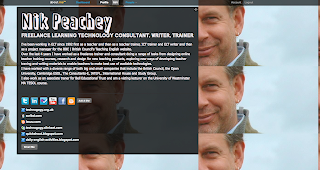

As you can see it is just a single page with a nice design, a bit of blurb about me and those all important links to all the things I do online. Below the surface though it also has a range of tools to help you track those services and it gives you information about how effective they are in building your network of contacts.

How to set up a social profile page

Let's start with the set up though. You'll need to go to: http://about.me register (for free) and you'll need a good high quality digital image of yourself that you can use as background (mine wasn't very good quality so I was forced to 'tile' it.

Once you are logged in you can start to design your background by choosing an image from your computer or selecting one from the site (best to have your own, but you can change it later).

Next you add your biography by simply typing your text into the fields. You then choose the colours and fonts for your text and the 'bio box' frame for the text. Be sure to use colours that make the text standout against the image background.


Lastly, the most important part is to start adding your services. This is simple to do. You just click on the service you want to add and then enter your username. If the service isn't there or you want to add a link to a website or another profile, just use the button that says 'Add URL or RSS' and you can add links to any web based site or service.


Once you have added your services, visitors to the page can have a peek at all the things you do. without leaving the page.


Building your network

This is all good stuff, but what is really great about this is the 'Dashboard' that gives you access to analytics information about your profile and some of the services you add there. You find out how many people click through to your profile and for how long. but you also get information about things like Twitter and find out which people retweet you the most or mention you etc. This can help to provide you with useful information about your network and find the best people to network with.
All in all I think http://about.me is a very useful free tool, whether you are building a network of friends colleagues or promoting your work.

How about you?
  • What tools do you use to create synergy across your social networking activities?
  • How do you reduce the amount of time you spend 'feeding' your networks?
  • What are the best tools for promoting your network activities?

By all means leave a comment or a question.

Friday, June 4, 2010

Knowledge sharing with Slinkset widgets

Posted by Nik Peachey

A few months back I wrote an article about creating your broadcast network to feed information to your PLN. In the article I included a section on a tool called Slinkset which I used to create my Technogogy news portal, which I use to share information and links to informative articles about education, technology and ELT.


Recently, I have discovered a new feature of Slinkset that automatically creates a widget that other blog or website managers can add to their site to aggregate and share the content of your portal.


I think this is a great feature and one that can really extend the reach of the information you are sharing beyond your immediate network.

The widget is very easy to install. You just need to direct web managers or bloggers to the relevant link on your portal. Here's the link to mine: http://technogogy.slinkset.com/widgets

On the widget page they will see what the widget looks like and and a simple piece of code that they can copy and paste into the side bar of their blog or the html of their site.

The links in the widget go directly to the source, in my case the articles I’m recommending, so you aren’t ‘stealing’ anyone’s traffic and the links are updated whenever you up date the links in your portal.

By all means take the code to my widget and try it out if you have a network that is interested in education, technology and ELT, or create your own Slinkset portal. It’s very simple to do and once you have it set up it takes about 2 mins to add a link to each article as you find it.

How about you?

  • What tools do you use to share knowledge?
  • Do you keep and share bookmarks?
Do please post a comment or question.

Tuesday, May 25, 2010

Give your sites a quick ping

Posted by Nik Peachey

With the number of blogs constantly growing it can become increasingly difficult to keep your audience and attract new readers, so it doesn't hurt every now and then to give your site a quick ping across the major search engines and directories.

Blogbuzzer is a free tool that can help you do this and give your sites' traffic a bit of a boost. It's very easy to use, just type in the name and URL of your blog and click on the 'Ping' button.
This will enable Blogbuzzer to send a message to many of the major blog directories and make sure that your site is indexed.

You can 'ping' up to 5 sites a day for free without registering or signing up. I've tried this a few times and each time it has brought a noticeable boost to my visitors stats. There is a premium service for $9 a year which automates the service for you and helps you monitor results etc. so if you are really serious about boosting numbers and don't mind spending some money, it might be worth thinking about (I won't be trying it).

This is a simple tool to use and it can be effective particularly if you haven't already got your blog or site registered.

I hope you find it useful.

How about you?

  • How do you boost traffic to your website or blog?
  • Is just writing good materials enough?
  • Are there any free services you have found useful?

Please leave a comment or suggestion if you think you can help other bloggers.

Thursday, October 8, 2009

How to create a visitor contact form

Posted by Nik Peachey

Most bloggers welcome contact with there readers, but that doesn't mean we want to put our email address on every page of our site. I know that most of us want visitors to leave comments, but there are times when this isn't really appropriate (e.g. Someone likes your blog and wants some advice or to offer you some work etc.)

Visitor contact offers a great free solution. You can see what it looks like and try it on the left of my site. It looks like this.
Just click on the contact tab and you'll see it opens up an email submission form with contact details that doesn't include my email address and it's spam protected.

How to create a visitor contact form

  • This is really quick and easy to set up. Simply go to the Visitor Contact site and sign up for the free service.
  • You only need to add very basic information such as email and create a user name and password to get started

  • Once that's done you just need to add the details of your site and you email address. You can decide whether you want your actual email address to be visible or not.
  • You can then add other information such as address, telephone number and Skype contact if you wish.
  • You can also set up an auto response message that people will be sent once they have emailed you.
  • Last of all you decide on the colours you want the tab to be and then click on 'Create Form and Get Button' and you are done.

  • This will create a code that you then just add to the script of your web page or blog. If you are using blogger, you just go to 'Layout' then 'edit HTML' and scroll down your code and add it at the bottom just above the tag that closes the body .
  • Be sure to save your code and then go back to your blog and the contact tab should appear on the left. Click it and send yourself a test message.


Visitor Contact is a great way to make yourself more accessible to your readers without getting loads of SPAM. You can add as many forms as you like to your account, so if you have more than one site you can manage them all from one account. You can also go back and edit your contact form at any point if you change your mind about the colour or amont of information you want to display.

All in all I think this is a useful free tool.

How about you?
  • What do you do to encourage reader contact?
  • Do you allow comments of your site?
Feel free to leave a comment with your recommendations for increasing contact with your readers.

Wednesday, September 9, 2009

10 free blogging tools for teachers

Posted by Nik Peachey

Well it's high time I got this blog moving again and I'm grateful to Karen Schweitzer education writer and author for sending in this guest post to get me started. Here she presents 10 great tools ranging from the basics for getting your blog started to some really interesting tools for getting your blog noticed. Thanks Karen.
Teachers who are interested in starting their own blogs or creating and managing student blogs, can find a number of helpful tools online. There are free blogging platforms made specifically for educators, virtual classrooms for students, and tools to help make other people more aware of your blogging efforts. Here are 10 free tools that would be particularly useful to teachers.

Edublogs - Edublogs is a free blogging platform for students and teachers. The WordPress powered platform hosts hundreds of thousands of education-related blogs. Teachers use it to host their own blogs, to manage student blogs, and to supplement classroom learning. Edublogs offers a wide range of features (20 MB of free space, customizable themes, step-by-step support, and import/export capabilities) and allows for simple uploading of images, videos, and other files.
Ning - Ning is a free online service that can be used to create your own social network. Ning networks can be kept private or made public. Any member who joins a network also has the option of keeping their profile private. Some of the things that can be placed on a Ning network include blogs, photos, videos, member profile pages, messaging systems, and RSS support. More than one million networks have been launched with Ning in the last two years, so if you would prefer, you can also find an existing social network to join.

Teacher Lingo - Created by a retired middle school teacher, this teacher blog community is a great place for teachers to connect, share ideas, and find lesson plans online. Teachers can begin their own blog or feed a previously created blog to the site. Teacher Lingo also offers a forum for friendly discussion.

Tumblr - Tumblr is an excellent option for teachers who are just beginning to blog. This free online blogging platform is easy to use and fully customizable. Features include the ability to create private blogs or private posts, multiple posting options, built-in apps, and ad-free themes. Tumblr also tweets posts automatically (or selectively if you choose.)

21Classes - 21Classes is a cooperative learning and blogging platform for students and teachers. It can be used to launch a class homepage and create individual blogs for students. Each student receives 1 MB of space with the free edition. Teachers have access to a central console to manage student accounts and content. More space and additional features are available with paid accounts.
ClassChatter - ClassChatter is a safe, secure, and private blogging platform for students and teachers. It can be used to create individual student blogs, group blogs, and assignment blogs. Unlike some blogging platforms, ClassChatter is free of advertising and includes an email-like communication option.

Class Blogmeister - Developed specifically for classrooms, this blogging engine offers free accounts to teachers, professors, school leaders, librarians, and other education professionals. Accounts can be used to post assignments, student writing, and instructional activities. Students are not allowed to have their own blogs but they can participate within the account established by their teacher.
IntenseDebate - IntenseDebate is a free commenting system for blogs. The system is meant to encourage more comments and enhance commenting capability. Features include comment threading, email notifications, reply-by-email, Twitter integration, hardcore moderation, blacklisting, comment voting, and many other useful widgets and plugins.

AddThis - This free online service can be used to build social bookmarking and feed buttons for your blog. These buttons make it easier for blog readers to stay up-to-date and share your content with other people. AddThis supports more than 50 popular services including Delicious, Digg, Facebook, MySpace, StumbleUpon, Twitter, Tumblr, and WordPress.

Twitterfeed - Teachers who blog and use Twitter will love Twitterfeed. This free web-based app tweets blog posts automatically so that you can share blog content with your Twitter followers.

Guest post from education writer and author Karen Schweitzer. Karen is the About.com Guide to Business School. She also writes about online classes for OnlineClasses.org.

How about you?

  • What blogging tools are you using?
  • Which of these 10 will you be checking out?
Related links: